Online Booking Widget for Your Website for medical clinics & dentists beauty salons & spas fitness studios & gyms consultants & lawyers

No-Password Access Panel
Data Privacy Safe
Setup in Minutes
Fully Customizable Design

Let your clients book appointments online — choose a service, pick a specialist, and reserve a time slot in a few clicks. No phone calls, no back-and-forth, no double bookings. Fully customizable design. No coding required.

Try the booking widget live

This is a real booking widget. Click through — select a service, choose a specialist, pick a time, and submit your details. See exactly how it works from your client’s perspective.

Designed for your clients and your team

Effortless for clients

Select a date, choose a specialist, pick an available slot, and submit contact details — all in a few clicks. No phone calls, no confusion.

Easy for your team

Manage the entire schedule from one simple panel. Block or free up slots with one click. Changes save automatically.

Clients’ data stays private

Appointments are sent directly to your email or Telegram. We don’t store personal data on our servers.

Looks great everywhere

Fully responsive and customizable. Match your brand’s colors, fonts, and style — looks native on any website.

A closer look at the booking widget

Everything you need to manage appointments smoothly, securely, and on your terms.

Secure, password-free access to your scheduling panel
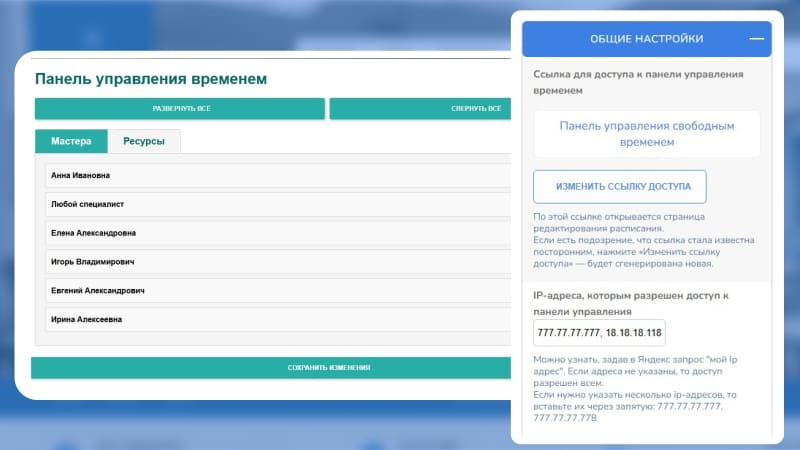
Tired of resetting forgotten passwords or sharing login details with every team member? Our scheduling panel takes a different approach — one that’s simpler and far more secure.

Just bookmark your unique secure link. That’s it. No usernames, no passwords, nothing to remember or accidentally share. For extra security, restrict access to your office IP address so the panel only opens from your workplace.

Need to change who has access? Regenerate the link in one click — the old one stops working immediately. No password leaks, no awkward handovers, just total control.

Mark slots as free or busy in one click
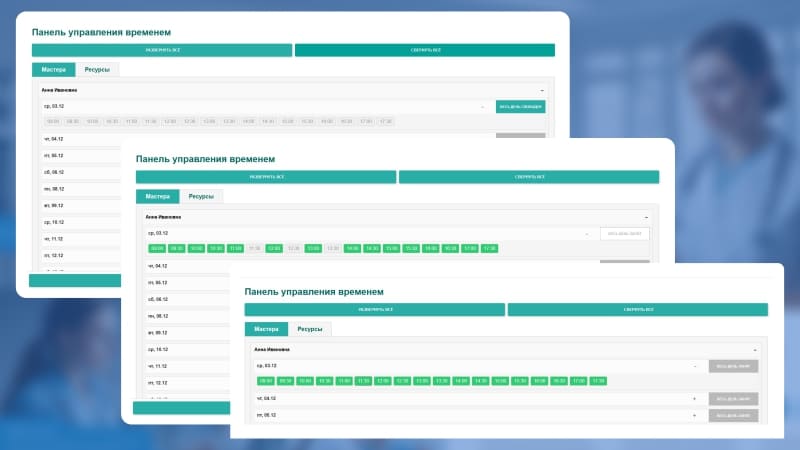
Your schedule works like an interactive map. You see every specialist’s time slots at a glance.

Click any slot — it becomes busy. Click again — it frees up. Need to block an entire day for one specialist? Just mark «Busy all day» and move on.

All changes can be saved manually, or let the smart auto-save handle it for you two minutes after your last click. Simple, visual, and surprisingly satisfying.

Smart scheduling that tracks specialists and resources
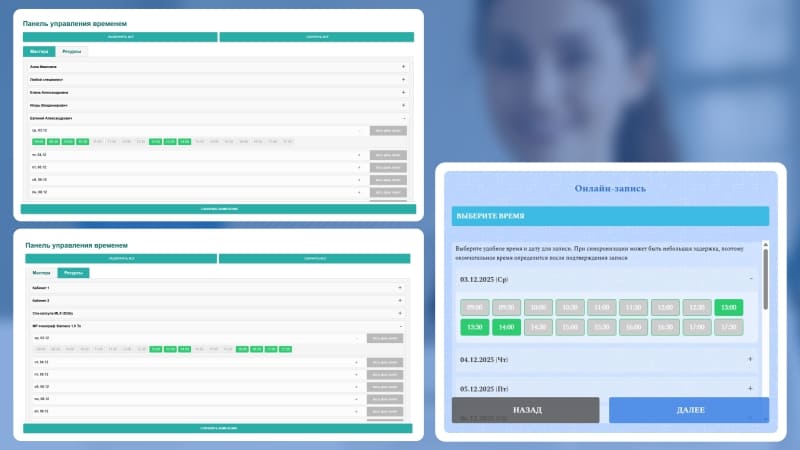
Here’s where things get really efficient. In the widget settings, create profiles for your specialists and your resources — rooms, equipment, tools, anything that can be double-booked. Link them to your services.

When a client selects a service, the system automatically checks both schedules. A time slot only appears as available when the right specialist and the right resource are free at the same time.

No double bookings, no conflicts, no confusion. Resource linking is optional — if you don’t need it, the system simply tracks specialist availability.

Flexible schedule — from broad settings to precise adjustments
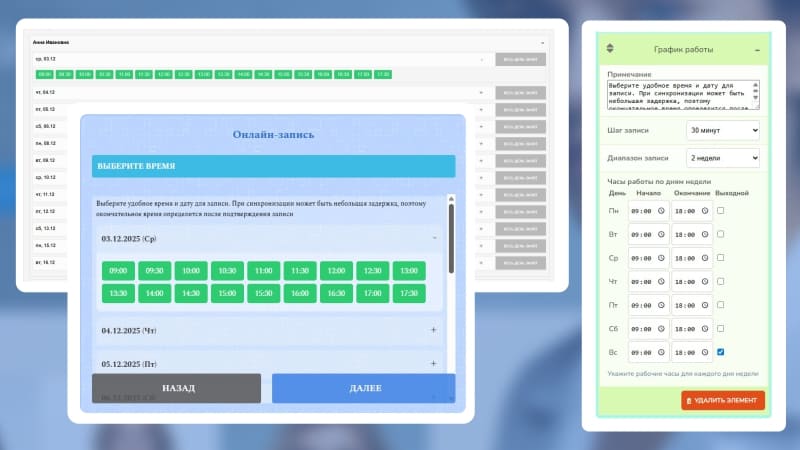
Set up your company’s main schedule template: working days, start and end times, session duration (15, 30, or 60 minutes), and how far in advance clients can book.

Every exception — days off, maintenance closures, personal adjustments for a specific specialist — you handle directly in the time management panel. Click a slot to mark it busy, click again to open it up.

Build a schedule that actually matches how your business runs, not some rigid template.

Three delivery options for bookings — Telegram, email, or client’s choice
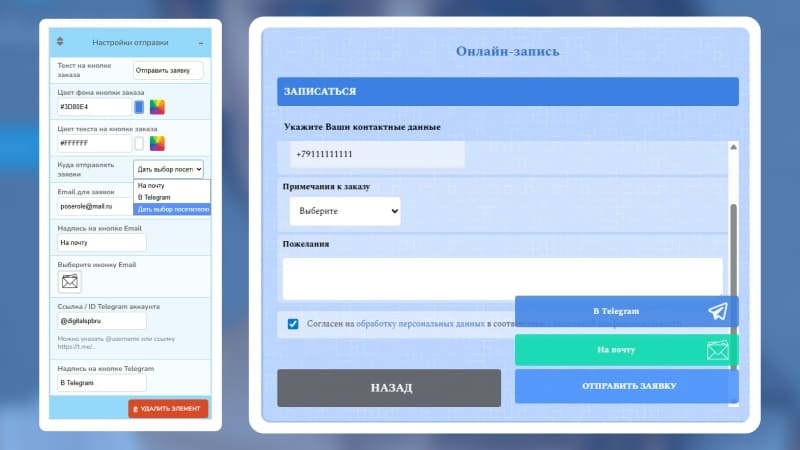
You decide how bookings reach your team. Set everything to arrive in Telegram for instant notifications. Route them to email for organized record-keeping. Or let the client choose their preferred channel — a small touch that builds trust and loyalty.

Whichever you pick, one thing never changes: bookings go straight from the widget to your chosen channel. Nothing is stored on our servers.

These are your clients, your data — we just make sure it gets to you safely and instantly.

A widget that fits anywhere — 8 display modes, 7 positions
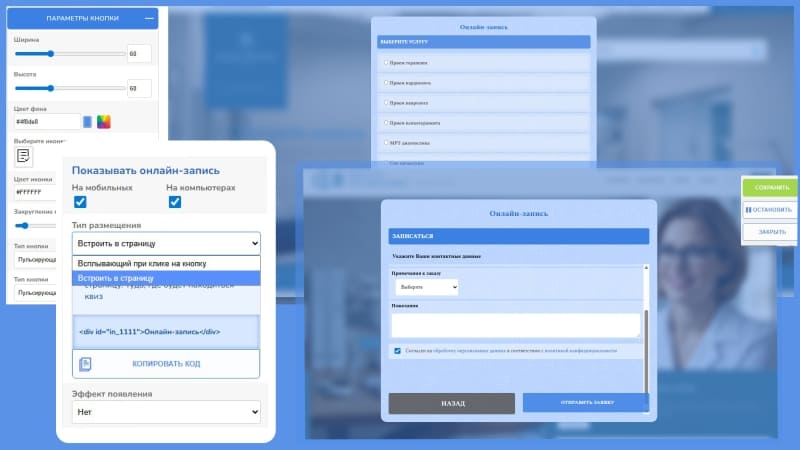
Control exactly how and where the booking widget appears. Choose to show it on mobile only, desktop only, or both.

Pick a format: a popup that appears on entry, scroll, or exit; a click-triggered widget; a combined popup + button; or a clean embedded form placed right inside any page using a simple code marker.

For popups, choose from seven on-screen positions: centered, in any corner, or as a slide-in panel from the left or right. Then decide which pages show the widget — all pages, only specific ones, or everywhere except certain URLs. Full control, no surprises.

Built for businesses that run on appointments

Medical clinics & dentists

No double bookings. System tracks doctors, rooms, and equipment. Client data stays private.

Beauty salons & spas

Manage specialists and expensive equipment. Offer multi-service bookings. Premium brand experience.

Fitness studios & gyms

Perfect for group and personal sessions. Flexible schedules per trainer. Trial bookings straight to Telegram.

Legal & notary offices

Absolute data privacy. Manage multiple lawyers’ schedules. Professional, corporate-ready design.

Consulting & accounting

Bookings without back-and-forth. One panel for multiple experts. Deliver bookings where your team works.

Online schools & tutors

Manage teacher availability and virtual rooms. Group and individual sessions. Branded booking experience.

Works with the platforms you already use

Use widgets on WordPress, Shopify, HTML websites, Tilda, Joomla, Bitrix, OpenCart, Ecwid, Laravel, and more.
Just add one script and launch your widget.


1C-Bitrix
Tilda
Google-sites
Wordpress
Laravel
Insales
Joomla
Opencart
Ecwid
Lightcms
Modx
Html

Launch your booking widget in 8 simple steps

Add your website

1 Create a project and copy one line of code to your site. One snippet powers all widgets.

Create the booking widget

2 In your project dashboard, click «Add widget» and select Booking. The basic structure is ready for you to customize.

Choose display settings

3 Pick popup or embed, set triggers (entry, scroll, exit, click), choose popup position (center, corner, slide-in panel), and target specific pages.

Customize the design

4 Start with the big picture — colors, fonts, progress bar, and background. Then dive into each step and tweak the details: headings, buttons, text, and images.

Set up resources

5 Add rooms, equipment, or other resources that affect availability. They will appear as options when you link them to services later.

Add services & specialists

6 Inside the Services step, add your services and link them to resources if needed. Inside the Specialists step, add your team members and link them to the services you just created.

Configure your availability

7 Set working days, hours, session duration, and booking range. Manage exceptions right in the time panel.

Publish & accept bookings

8 Hit publish. Clients start requesting appointments instantly. Bookings arrive in your email or Telegram immediately.

Pricing

Simple plans for every stage — from first leads to scaling your business

  • Free Trial

    Try all features risk-free

    • One website
    • All widgets included
    • Ready-to-use templates
    • Full access for 15 days
    • No credit card required
    Free
  • Pro
    • Up to 5 websites
    • All widgets included
    • Calculators & booking widgets
    • Unlimited widgets and views
    • Save 20% with annual billing
    $48 month billed anually
    $60 /month billed monthly

Frequently Asked Questions

Yes. The link contains a unique cryptographic token — impossible to guess. You can also restrict access by IP address and regenerate the link instantly if needed.
Head to your widget settings and click «Change access link». The old link stops working instantly — only the new one works from that moment on. All your data stays intact.
Yes. In the settings panel, add your office IP address. Access will only be possible from that location.
Bookings are sent directly to your email, Telegram, or both — depending on your settings. We don’t store personal data on our servers.
Yes. The widget checks availability of both specialists and resources (rooms, equipment) in real time. Only truly free slots are shown to clients.
Yes. Works with WordPress, Shopify, custom sites, and all platforms.
Yes. You get a full 15-day trial with access to every widget and all features on the platform. No credit card required — just sign up and start building.

Ready to let clients book themselves?

Launch your booking widget in minutes. Accept appointments 24/7, fill your schedule, and give your team hours back every week.