Website Calculator Builder for windows, doors & ceilings custom furniture & kitchens beauty salons & clinics any product or service

No Formulas Needed
Fully Customizable Design
Setup in Minutes
Data Privacy First

Create a custom pricing calculator for your website in minutes. Let clients choose options, see the price update in real time, and submit a detailed request — all without complex formulas or coding. Or pick a ready-made template from our growing library and launch even faster.

Try our online calculator live

This is a real calculator widget. Select options, watch the price update, and see exactly how it works from your client’s perspective.

That’s it. A transparent pricing experience that builds trust and turns browsers into buyers — right on your website.

Let your website do the quoting for you

Your clients want to know what things cost before they reach out. But every project is different, and a static price list can’t cover every option. A website calculator gives them instant estimates based on their own selections — sizes, materials, add-ons, quantities. They see exactly how the price adds up, and when they’re ready, they submit a detailed request. Your team receives a clear, pre-qualified order with all the specifics filled in. Less guesswork, fewer questions, faster conversations.

Works with the platforms you already use

Use widgets on WordPress, Shopify, HTML websites, Tilda, Joomla, Bitrix, OpenCart, Ecwid, Laravel, and more.
Just add one script and launch your widget.


1C-Bitrix
Tilda
Google-sites
Wordpress
Laravel
Insales
Joomla
Opencart
Ecwid
Lightcms
Modx
Html

Start with a template from our library

Don’t start from scratch. Pick a ready-made calculator, customize prices and options, adjust the design, and launch. Our library keeps growing with calculators for every industry.

Window Calculator

A ready-to-use step-by-step calculator built with real window industry logic: dimensions, construction types, and additional options are already linked together.

Just update the prices and properties to match your catalog, style it to fit your brand, and test the calculation in the dashboard.

Clients understand exactly how the price comes together, and you get clear, detailed requests sent straight from the website.

Ceiling Calculator

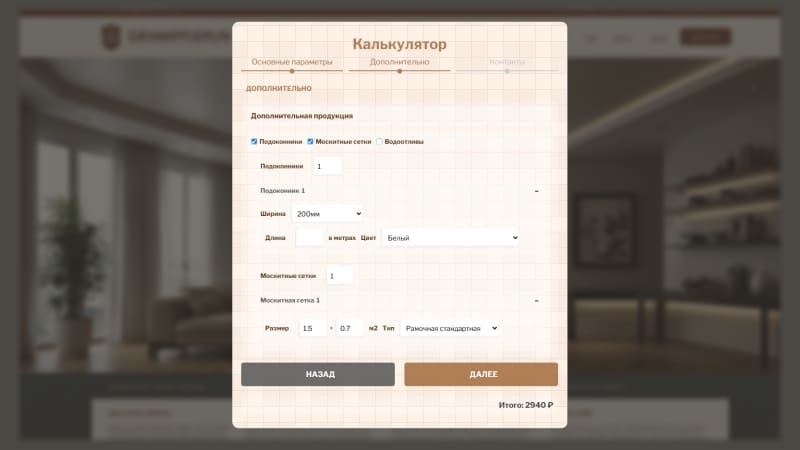
A pre-built calculation model that handles room dimensions, ceiling types, materials, lighting, and extra services.

The step-by-step structure is already in place so clients enter their details once and instantly see their estimated budget.

Replace the default values with your own prices and options, preview the final result, and publish. This format builds trust and delivers more informed, ready-to-convert inquiries.

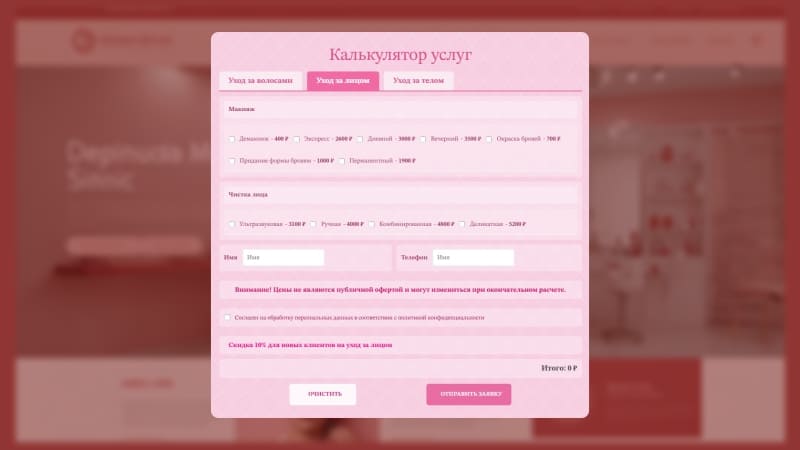
Beauty Salon Calculator

A tabbed slider widget designed for service-based businesses.

You adapt the calculator to your own treatments, procedures, and formats — no complex logic, no manual math. The structure is already organized so you can customize it for your salon and easily update it later.

Clients browse services and see the total before booking, which means fewer back-and-forth questions and more requests sent directly through the widget.

Sliding Door Calculator

A pre-configured step-by-step calculator covering door dimensions, number of panels, construction types, and specific hardware features.

Adjust the prices and parameters to match your product range, check the calculation in the dashboard, style the design, add your contact fields, and set the email address for receiving requests.

Your clients define exactly what they need while your sales team receives a fully formed request aligned with the client’s budget and your product catalog.

Why this calculator builder stands out

No formulas, no code, no complexity. Just a visual way to build pricing tools that work for your business.

3 calculator formats

Single-page, tabbed slider, or step-by-step quiz — pick the format that fits your product and client journey.

No formulas needed

Build pricing logic visually. Choices flow from bottom to top, and the system calculates everything automatically.

Flexible discounts & promotions

Set discounts that trigger by date, by checkbox, by order total, or by quantity. Apply them to the entire order, specific categories, or individual items.

Multi-level pricing items

Create nested sub-items that build a single product price from bottom to top based on linked properties and options.

4 quantity calculation modes

Standard input, area calculation (length × width), volume calculation (length × width × height), or no quantity — price from properties only.

Separate product selection

Let clients configure multiple products in one session — different dimensions and options for each window, room, or item.

Full design control

Customize colors, fonts, backgrounds, and every visual element. Match your brand perfectly through the visual editor.

Multiple display options

Show as a popup (center, corner, slide-in panel) or embed inline. Trigger on entry, scroll, exit, or click.

Privacy-first data handling

Requests are sent directly to your email. We don’t store client data on our servers — it stays under your control.

Three formats, endless possibilities

Pick the layout that best fits your product, your clients, and your sales process.

Single-Page Calculator
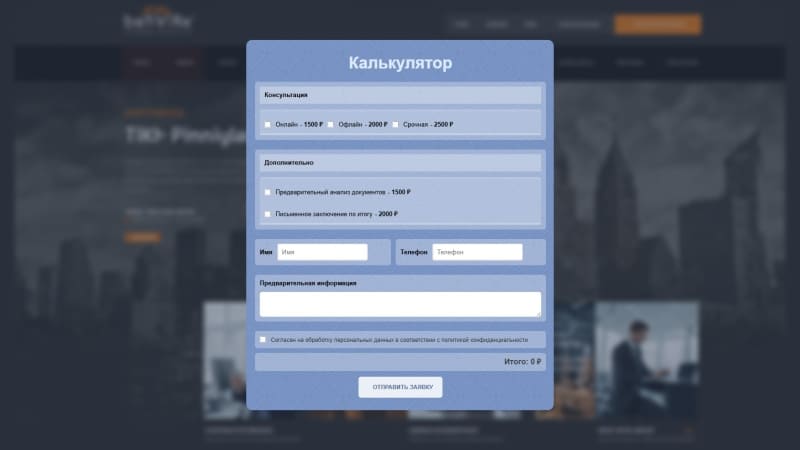
Everything on one screen. Clients see all options and the total price at once — no clicking between steps, no interruptions.

Ideal for simple to medium complexity calculations where you want to keep the experience fast and direct.

Easy to set up, easy to test, easy for clients to compare and decide.

Tabbed Slider Calculator

Structure a more complex calculation into organized tabs and subsections without overwhelming your clients.

Add new sections and pricing paths without rebuilding the entire structure — each tab can be managed independently. Clients move through the options at their own pace, feeling in control the whole way.

Great for service menus, multi-category products, and businesses that need room to grow.

Step-by-Step Quiz Calculator

Guide clients through one question at a time. Each answer leads naturally to the next, building a personalized result step by step.

The quiz format holds attention, reduces drop-off, and turns a complex configuration into a friendly conversation. Unlimited steps and nested pricing items let you model even the most detailed products and services.

When clients finish, they feel like the price was built just for them — because it was.

Perfect for businesses with variable pricing

Manufacturing

Price windows, doors, custom furniture, kitchens, and any made-to-order products interactively.

Home renovation

Calculate repairs, ceiling installations, balcony finishing, and other project-based services.

Beauty salons & clinics

Let clients build their own service packages and see the total before booking.

Auto services

Estimate repair costs and tuning services based on selected parts and labor.

B2B services

Calculate logistics, equipment rental, consulting, and accounting services.

Legal & notary offices

Price consultations and document preparation based on case type and complexity.

Launch your calculator in 10 simple steps

Add your website

1 Create a project and copy one line of code to your site. One snippet powers all widgets.

Create the calculator widget

2 In your project dashboard, click «Add widget» and select Calculator. Pick a ready-made template or start from scratch.

Set up display settings

3 Choose devices (desktop and/or mobile), format (popup or embed), popup position (center, corner, slide-in), and triggers (entry, scroll, exit, click).

Choose format & structure

4 Pick one of three layouts: single-page, tabbed slider, or step-by-step quiz.

Configure lead capture

5 Add your email address to receive requests, connect analytics goals, and enable UTM tracking.

Set up steps or tabs

6 Depending on your format, add steps, tabs, or go straight to adding calculator items and form fields.

Add pricing items

7 Name each item, set its price, and add surcharges for extra options. For complex pricing, nest sub-items inside main items.

Add discounts & promotions

8 Set up discount rules based on order total, quantity, date, or checkbox. Apply to the full order, specific items, or individual options.

Add form fields & final elements

9 Include a total display, contact fields (name, email, phone, checkboxes), text blocks, and consent text.

Test & publish

10 Preview everything in the dashboard, check the calculations, and hit publish. Requests start arriving in your inbox.

Pricing

Simple plans for every stage — from first leads to scaling your business

  • Free Trial

    Try all features risk-free

    • One website
    • All widgets included
    • Ready-to-use templates
    • Full access for 15 days
    • No credit card required
    Free
  • Pro
    • Up to 5 websites
    • All widgets included
    • Calculators & booking widgets
    • Unlimited widgets and views
    • Save 20% with annual billing
    $48 month billed anually
    $60 /month billed monthly

Frequently Asked Questions

No. The calculator works through visual logic — you set prices for items and options, and the system handles the math automatically.
Yes. Use fixed or percentage surcharges on any option. The price updates in real time as clients make selections.
Absolutely. Set discounts that trigger by order total, quantity, date range, or a checkbox. Apply them globally or to specific items.
You can set up standard quantity (pieces, meters), area (L × W), volume (L × W × H), or skip quantity entirely and price by properties only.
Yes. The separate selection feature lets clients set different dimensions and options for each item — like multiple windows or rooms.
Submissions are sent directly to the email address you specify in the widget settings. We don’t store client data on our servers.
Yes. 15 days, full access, no credit card required.

Ready to give your clients instant pricing?

Build your first calculator in minutes. Let visitors configure their own orders, see live prices, and submit detailed requests — all automatically.